Flying Club Communication: How to Keep Members Informed
Updated:
A flying club runs on more than a shared aircraft schedule. Members need to know when an aircraft is unavailable, when operating rules change, what is happening around the club, and whether their reservations are up to date. The challenge is making sure the right information reaches the right people without overwhelming everyone with messages.
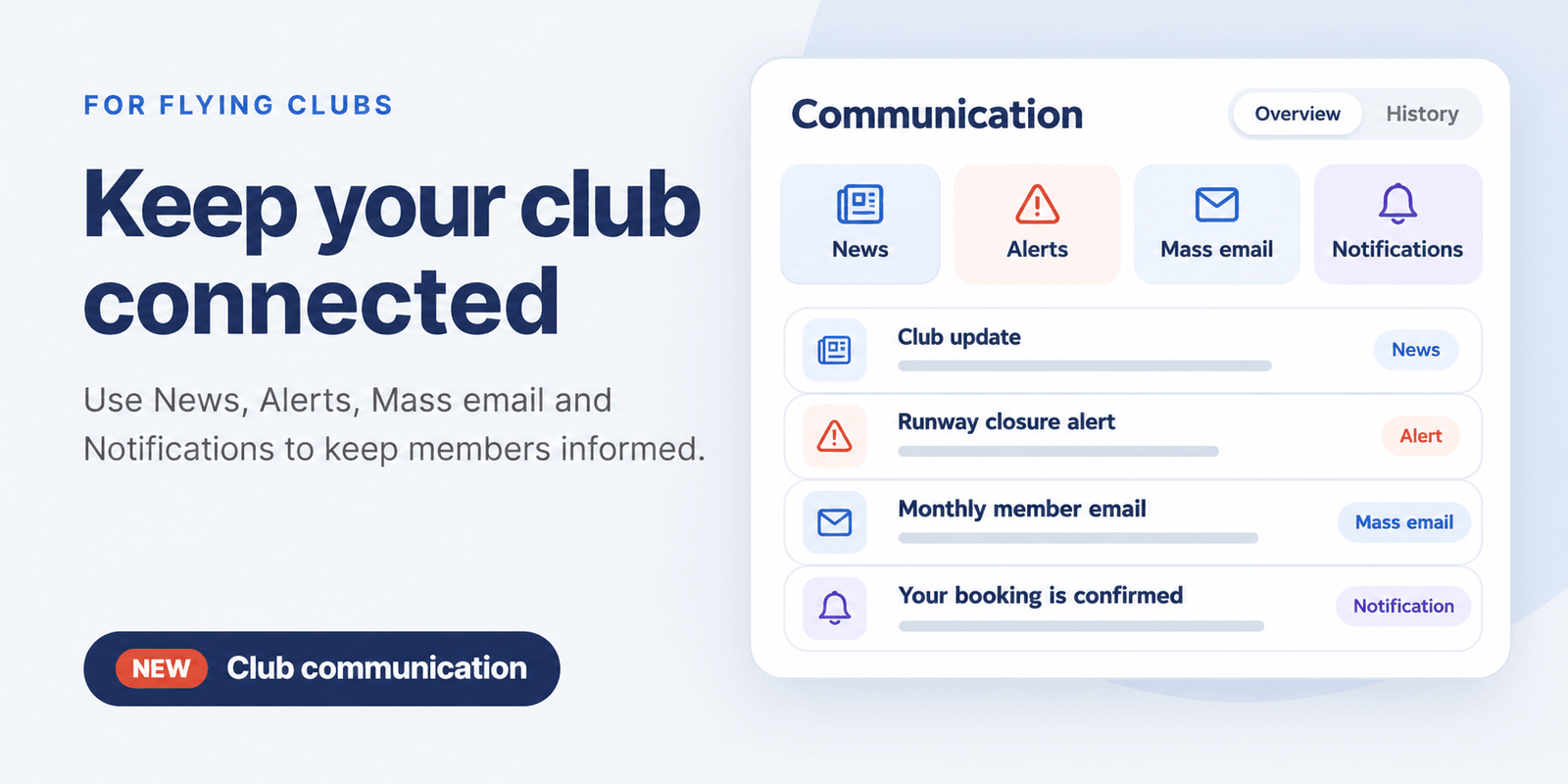
A useful communication system separates four jobs: news for updates worth revisiting, alerts for notices that need attention, mass email for direct outreach, and reservation notifications for scheduling activity. Here is how to use each one.
1. Club news: Give announcements a permanent home
News works best for updates that members may need to find again. Think about a new aircraft joining the fleet, a change to operating procedures, an upcoming safety seminar, a club meeting, or the results of a member vote.
Rather than bury these announcements in individual inboxes or a group chat, publish them in a central place where members can return when they need the details. Use clear titles and include the date, what changed, who is affected, and any action members should take.
For example, an announcement titled ‘New checkout procedures for N123AB’ tells members more than ‘Important update.’ A short summary helps people decide whether they need to read the full details.
2. Club alerts: Highlight time-sensitive information
Not every update has the same urgency. An upcoming fly-in can live in club news; an operational notice about a temporarily unavailable aircraft needs to stand out. Alerts are suited to important, time-sensitive information that members should notice promptly.
Keep alerts specific and actionable. Explain what happened, which aircraft or members are affected, when the change takes effect, and when you expect the next update. Avoid treating every routine announcement as an alert, or members may start tuning them out.
An alert should complement the schedule and other club records, not replace accurate availability or maintenance information.
3. Mass email: Reach members directly, all at once
Some messages should not depend on members logging in and noticing an announcement. A policy change that affects everyone, a meeting reminder, or a club-wide operational update may deserve a direct email.
With PilotSchedule mass email, administrators can send a message to recipients at once and see who received it. That visibility is especially useful when a message matters to the whole organization. Delivery or receipt visibility should not be mistaken for proof that every recipient opened or read the message.
For example, a club could email 150 members about a revised reservation policy in one send rather than contacting them individually. One email sent to one person counts as one email, so that message uses 150 emails from the monthly allowance.
PilotSchedule plans include monthly mass email allowances: Solo includes 1,000, Basic 3,000, Pro 10,000, and Elite 25,000. Free trials include 200. The allowance resets on the 1st of every month, and administrators can see how many remain while composing a message.
These allowances are designed for ordinary club communication. Even the busiest club month in the past year used approximately 1,500 emails. For most clubs, that leaves plenty of room for practical updates without worrying about each send.
You can compare the allowances on the PilotSchedule pricing page.
4. Reservation notifications: Keep scheduling activity clear
Reservation notifications have a different role. They relate to scheduling events rather than general club news. Members need reliable information about their bookings, and automatic reservation-related notifications help reduce manual follow-ups and confusion.
For a flying club, reservation communication can be especially important when plans change. Members should still check the live schedule and follow the club’s operating procedures rather than relying on an old message for current aircraft availability.
Well-defined reservation rules and cancellation policies also help members understand what is expected before they book or cancel.
For additional ideas, read our guide to aircraft scheduling rules and our flying club cancellation policy guide.
Which communication method should a flying club use?
Use news when an announcement should remain available for members to refer back to. Use alerts when a notice needs immediate attention. Use mass email when the message should be delivered directly to a wider group. Use reservation notifications for scheduling-related updates that belong to the booking workflow.
Often the right answer is a combination. A revised operating rule might start as a full news announcement, be sent by mass email so everyone receives it, and be supported by an alert if there is an urgent deadline. The underlying rule should also be reflected in the appropriate club settings.
Five practical habits for clearer club communication
First, give every message a meaningful subject. Second, put the requested action near the top. Third, include dates, aircraft identifiers, and affected members when relevant. Fourth, use the least urgent channel that still gets the job done. Fifth, maintain one clear source of truth for policies, documents, and reservations.
Consistency matters more than message volume. Members benefit when they know where to look for reference information, when to expect direct messages, and how to confirm their reservation details.
Keep your flying club organized and your members informed
PilotSchedule brings scheduling and club-management communication into the same platform. News, alerts, mass email, and reservation notifications each serve a different purpose, but together they help administrators communicate more clearly and members stay informed.
Explore PilotSchedule’s flying club scheduling software or create your free club to get started.
Frequently asked questions
What is the difference between club news and alerts?
News is for announcements and information members may need to revisit. Alerts are better for notices that need attention promptly, especially operational changes.
How do monthly mass email allowances work?
Each recipient counts as one email. A message sent to 150 members uses 150 emails. Allowances reset on the 1st of each month, and PilotSchedule displays the remaining allowance while you compose.
Should a club rely on email for reservation information?
Reservation-related notifications help members stay aware of scheduling events, but the live schedule should remain the reference for current availability and reservations.