New in PilotSchedule: Briefing Time

Updated: Oct 15

Briefing time is live in PilotSchedule. A reservation can now hold the instructor for the whole lesson, brief and debrief included, while the aircraft is held for the flight only. The airplane no longer sits idle during the briefing, and the instructor no longer looks free while they are still debriefing the last student.
Why we built it
The lesson starts at the whiteboard, not at the propeller. The pre-brief before the flight and the debrief after it are part of every lesson, but a reservation had one start and one end for everything in it.
That left clubs with two bad choices. Block the aircraft for the whole lesson and it sits on the ramp while you brief. Book only the flight and the instructor looks free on the schedule while still debriefing, so someone books them at noon sharp and the debrief gets cut short. Either way the schedule was wrong, and someone sorted it out by phone.
What Briefing time does
A reservation that has both an instructor and a resource (an aircraft, a simulator, or anything else your club schedules) can now carry a pre-brief and a post-brief.
The instructor and the pilot are held for the whole lesson, briefing included. The aircraft or other resource is held for the flight only, so the next member can book it the minute the flight ends.
For example, a flight from 10:00 AM to 12:00 PM with a 15 minute pre-brief and a 30 minute post-brief holds the instructor and student from 9:45 AM to 12:30 PM. The aircraft is held from 10:00 AM to 12:00 PM, and is free for someone else from noon.
How it works
Off by default. Nothing changes for your club until an admin turns it on in Club Settings, under Features. Clubs without instructors can ignore it.
Club defaults. Under Reservation Rules, set a default pre-brief and post-brief: none, 15, 30, 45 or 60 minutes. These fill in automatically on new reservations.
Only where it applies. Briefing time appears on the booking form only when the reservation has both an instructor and an aircraft or other resource. Solo flights and instructor-only ground lessons are unchanged.
One switch per reservation. An "Add briefing time" switch on the booking form turns it on or off for that reservation, and a short timeline shows the flight and the briefing at a glance.
Who can change the minutes. If you prefer, only instructors, staff and admins can change the briefing minutes. Members then see the club's minutes, read only.
No double booked instructors. PilotSchedule checks instructor availability against the whole lesson, briefing included. If a booking would overlap an instructor's briefing, the member is told, with a hint such as "Shorten the pre-brief or start the flight later."
Where you'll see it
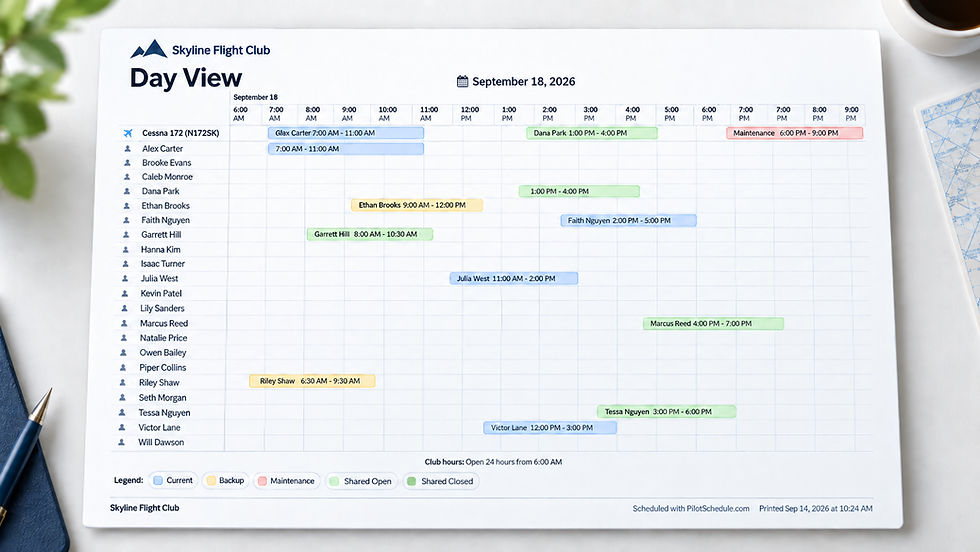
Look at the Day View and the instructor's bar runs the length of the lesson, with the briefing shaded lighter at each end, while the aircraft's bar covers only the time the engine is running. In the Pilots view, and for an instructor in the Resources view, the reservation shows "With briefing: 9:45 AM to 12:30 PM", so a student knows when to be in the room, not just when to be at the airplane.
Tooltips, the printed schedule, the reservation history and all reservation emails include the briefing too, for example "Brian Carter and Owen Parker held 9:45 AM to 12:30 PM". It works on phones, tablets and iPads, like the rest of the schedule views.
Turning it off later is safe. Reservations that already have briefing time keep it, and those instructors stay held. New reservations simply can't add it.
Who benefits
Flight schools and clubs with instructors. Your airplane can fly a noon lesson while the 10:00 AM student is still in the debrief. Ground time no longer costs you a block of aircraft time.
Instructors. Your schedule finally shows your real day. Nobody books you at 12:00 while you are still at the whiteboard going over the 11:30 landing.
Students and pilots. You see when to show up for the brief, not just when the engine starts, and you know the debrief is on the schedule, not squeezed into whatever is left.
Admins. One setting, sensible defaults, and the choice of who may change the minutes. If your instructors want to own their briefing times, let them. If you want the club to set them, keep that control.
How to turn it on
Go to Club Settings, open Features, and turn on Briefing time.
Under Reservation Rules, set your default pre-brief and post-brief.
Optionally, turn on "Only instructors, staff and admins can change briefing minutes on a reservation".
Book a lesson with an instructor and an aircraft, and you'll see the briefing on the form.
Put the briefing on the schedule
If your club flies with instructors, turn Briefing time on and book one lesson. You'll see the instructor held from the first marker on the whiteboard to the last note of the debrief, and the airplane free the minute the engine stops. That's how the day actually runs. Now the schedule shows it.
Explore Briefing Time in PilotSchedule
See how pre-flight and post-flight briefings work without unnecessarily blocking aircraft availability.