New in PilotSchedule: Club Documents, Redesigned Pilot View & Resources View


We’ve rolled out another set of improvements to PilotSchedule, including three significant additions: a new Club Document Repository, a redesigned Pilot View, and an updated Resources View.
The goal is simple: make scheduling easier to work with, make club administration more organized, and continue improving the experience across desktop, tablet, and mobile devices.
All of these updates are available now.
A New Club Document Repository for Administrators
Club Administrators now have a dedicated place to securely store documents that belong to the club itself.
The new Club Documents area is available from Club Settings and can be used for administrative files such as:
Club policies and operating handbooks
Insurance documents
Member onboarding guides
Safety procedures
Club forms and reference material
Other internal administrative documents
Documents can include expiration dates when appropriate, making it easier for administrators to see whether time-sensitive documents are current.
Club Documents are private to Club Administrators. Regular club members cannot view or access files stored in this repository.

This is separate from documents associated with individual pilots or members, giving clubs a centralized location for organization-level files.
A Redesigned Pilot View
The Pilot View has received a complete visual refresh.
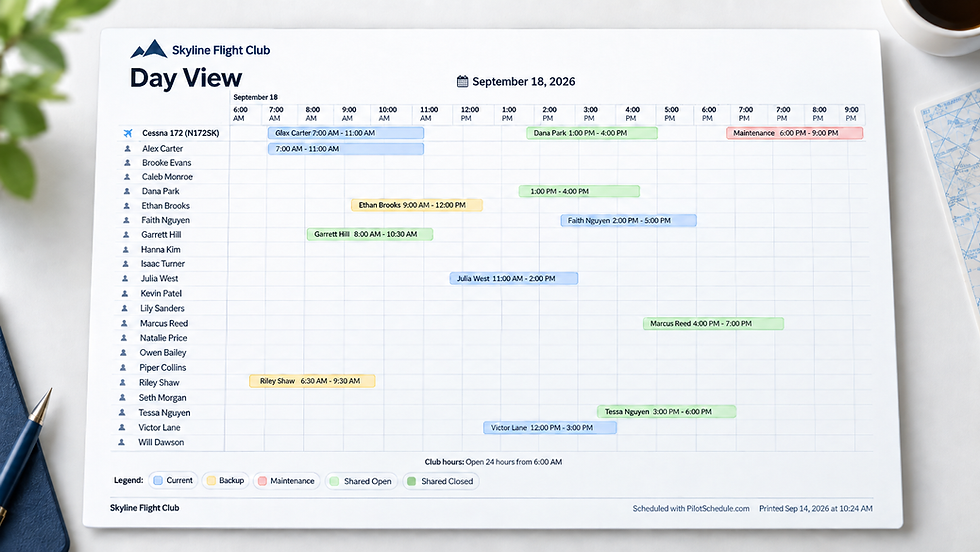
The new design makes it easier to review a pilot’s reservations across the schedule and provides a cleaner, more consistent experience with the recently redesigned Day View.
The updated Pilot View includes improved:
Calendar readability
Reservation visibility
Navigation between dates
Day, week, month, and agenda views
Desktop, tablet, and mobile layouts
Date selection on iPad and touch devices
The result is a scheduling view that feels much more at home on modern devices while still keeping the information club members need front and center.
The Resources View Has Been Redesigned Too
We’ve also updated the Resources View.
For clubs that schedule aircraft, instructors, rooms, simulators, or other custom resources, Resources View provides another way to quickly understand how those resources are being used.
The redesign brings the same cleaner interface and responsive behavior to this part of PilotSchedule.
It is particularly useful when you want to review reservations from the perspective of a specific resource rather than a specific pilot.
The iPad date-selection issue that previously affected some scheduling views has also been corrected in both Pilot View and Resources View.
Club Settings Are Easier to Navigate
We’ve also reorganized Club Settings to make commonly used options easier to find.
Several sections now use clearer names throughout PilotSchedule:
Schedule → Time Settings
Additional Settings → Preferences
Reservation Setting → Reservation Rules
The settings navigation has also been reorganized so frequently used areas appear first.
The settings overview remains visible while scrolling, and selecting a section now takes you directly to the correct heading.
A More Compact Reservation Rules Page
Reservation Rules previously required a lot of scrolling. The page is now organized into logical groups covering:
Reservation policy
Booking limits
Daily limits
More Improvements Are on the Way
These releases are part of a broader effort to continue improving PilotSchedule across scheduling, club administration, mobile usability, and everyday workflows.
And we’re not finished.
Several more PilotSchedule improvements are already in the pipeline, with additional updates coming soon.
Ready to simplify your club scheduling and experiecing what's new in PilotSchedule?
PilotSchedule helps flying clubs, aircraft partnerships, and aviation organizations manage reservations, resources, pilots, and club administration in one place.
Create your PilotSchedule account and get started today.
Already using PilotSchedule? Log in to explore the latest updates.