How to Create a Fair Flying Club Cancellation Policy

Updated: Sep 18
Aircraft time is limited, especially in a busy flying club.
When a member cancels a reservation at the last minute, another member may lose the chance to fly, an instructor may be left with an empty block, and an aircraft can sit unused during one of the most desirable times of the week.
That is why many clubs need a clear flying club cancellation policy.
The goal should not be to punish members for changing plans. A good policy creates predictable expectations, encourages members to release aircraft early when they know they cannot fly, and still leaves room for weather, maintenance, safety and genuine emergencies.
Here is a practical framework for creating one.
What a Good Flying Club Cancellation Policy Should Accomplish
A useful policy should answer a few basic questions:
How much notice should a member give before cancelling?
What happens when a cancellation is made inside that window?
Are weather and maintenance treated differently?
Should the member provide a cancellation reason?
What happens with repeated late cancellations or no-shows?
Where can members see the policy before they cancel?
The best policies are short enough that members will actually read them.
A few clear sentences are usually better than a page of rules.
Choose a reasonable cancellation window
The first decision is how many hours before a reservation starts your policy should apply.
There is no single number that works for every club.
A club with several aircraft and frequent availability may be comfortable with a shorter notice period. A smaller club with one or two heavily booked aircraft may need more notice so another member has a realistic chance to use the slot.
Common approaches include:
12 hours for clubs that want a relatively flexible policy
24 hours for a simple next-day notice rule
48 hours when aircraft or instructor availability is especially limited
The important part is consistency.
Members should know exactly when a cancellation becomes a "late cancellation" under your club's rules.
For example:
Cancellations made less than 24 hours before the reservation start time are considered late cancellations.
That is much easier to understand than a vague rule such as "Please cancel as early as possible."
Keep weather and safety separate from convenience
A cancellation policy should never create pressure for a member to make an unsafe flight just to avoid a penalty or negative mark.
Weather, aircraft condition and pilot safety are different from cancelling because plans changed.
Consider clearly stating how your club handles situations such as:
Unsafe or deteriorating weather
Aircraft maintenance or grounding
An instructor cancelling
Illness or a genuine emergency
Airport closures or operational restrictions
Your club may decide that these situations are exempt, reviewed individually, or simply recorded differently from a normal late cancellation.
Whatever approach you choose, make the distinction clear.
Members should feel comfortable cancelling when a flight should not be made.
Decide how to handle late cancellations and no-shows
Not every club needs a financial penalty.
Depending on your operation, you might choose:
No penalty, with the policy serving mainly as a reminder
A warning after repeated late cancellations
A fee for repeated late cancellations
An instructor charge when the instructor's time was reserved
A separate rule for complete no-shows
Administrator review after a certain number of incidents
If your club does use fees, explain exactly when they apply and who has authority to waive them.
Avoid rules that are so complicated that members cannot predict what will happen.
A simple policy that is consistently applied is usually easier to administer than one with many exceptions and calculations.
Consider asking for a cancellation reason
A short cancellation reason can be useful, especially when a club is trying to understand why reservations are being released at the last minute.
Reasons might include:
Weather
Aircraft issue
Illness
Instructor unavailable
Work or personal conflict
Other
The goal is not to make members defend every cancellation.
It is to give administrators useful context when reviewing reservation history and repeated late cancellations.
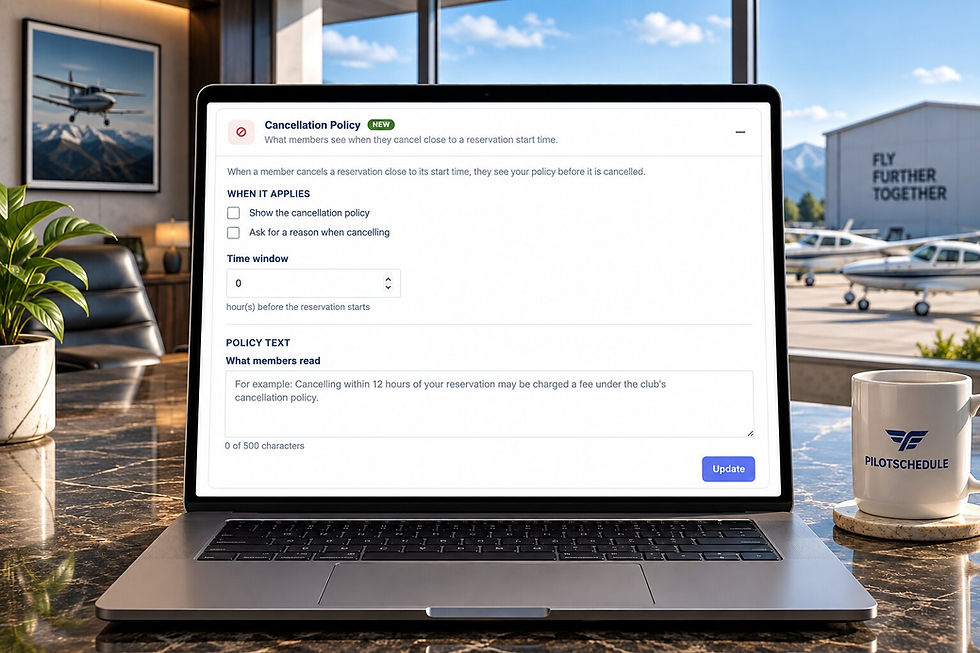
PilotSchedule can optionally ask members for a reason when they cancel inside your club's cancellation window. The reason is saved with the cancelled reservation for future reference.
Show the policy when it matters
A policy hidden inside a handbook is easy to forget.
One of the most useful times to show it is immediately before a member confirms a late cancellation.
That gives the member a clear reminder of the club's rules at the exact moment they apply.
PilotSchedule now lets club administrators add a Cancellation Policy under Club Settings.
You can:
Write the policy in a few sentences
Choose how many hours before a reservation starts the policy applies
Show the policy to a member before a cancellation inside that window is completed
Optionally ask the member for a cancellation reason
Keep that reason with the cancelled reservation
PilotSchedule does not need to decide what your policy should be. Your club sets the rule that fits your operation. Sample flying club cancellation policy.
Here is a simple example that can be adapted for your club:
Cancellation Policy Please cancel reservations as soon as you know you will not be able to fly so another member has an opportunity to use the aircraft. Cancellations made less than 24 hours before the reservation start time are considered late cancellations. Members may be asked to provide a reason for the cancellation. Weather, aircraft maintenance, safety concerns and genuine emergencies may be handled separately at the discretion of the club.
Keep in mind that every club operates differently. Adjust the wording, notice period and consequences to match your bylaws, membership agreement and normal operating practices.
What about no-shows?
A no-show is usually more disruptive than a late cancellation because the aircraft remains blocked until the reservation time has already started.
For that reason, many clubs treat no-shows separately.
Your policy can define a no-show clearly, for example:
A reservation that is not cancelled before its scheduled start time and is not used may be considered a no-show.
If your club tracks repeated no-shows, use reservation history consistently rather than relying on memory or informal complaints.
Review the policy after a few months
The first version does not have to be permanent.
After the policy has been in use for a while, review:
How many late cancellations are occurring
Whether members are releasing aircraft earlier
Whether your notice window is practical
Whether weather-related cancellations are causing confusion
Whether requiring a reason is giving administrators useful information
Whether repeated no-shows are still a problem
If a 48-hour rule proves unnecessarily strict, change it.
If a 12-hour rule leaves popular aircraft sitting unused, consider giving members more notice.
A cancellation policy should support the way your club actually operates.
A simple checklist
Before publishing your policy, make sure it answers these questions:
How many hours of notice are expected?
What counts as a late cancellation?
How are weather and safety cancellations handled?
How are maintenance cancellations handled?
Are members asked to provide a reason?
Are no-shows treated differently?
Are there consequences for repeated late cancellations?
Where can members see the policy?
Who can make exceptions?
Is the policy short enough that members will actually read it?
If members can answer those questions, your policy is probably clear enough.
Put the policy next to the schedule
Reservation rules work best when they are part of the scheduling process rather than buried in a separate document.
PilotSchedule's new Cancellation Policy feature lets your club define its own notice period and show the policy to members when they cancel inside that window.
To set it up, go to Club Settings and open the Cancellation Policy section.
If your club is still managing aircraft reservations through spreadsheets, calendars or group messages, explore our flying club scheduling software or create a free PilotSchedule account.