Introducing the Club Library: One Place for Every Document Your Members Need

Updated: Sep 18

Running a flying club means keeping track of more than aircraft and schedules. Members regularly need access to checkout forms, current operating rules, insurance certificates, and other important club documents.
When those documents are scattered across emails, shared folders, or individual devices, members may have to ask an administrator every time they need something.
The PilotSchedule Club Library gives your club one place to organize and share the documents members need. Administrators can upload documents once, control who can see them, and make them available alongside the rest of the club's scheduling tools.
What the Club Library does
The Club Library gives administrators a central place to store important club documents and make them available to the appropriate members.
Upload a document once, add the relevant details, choose who should have access, and members can find the documents that have been shared with them.
This can include operating rules, insurance certificates, aircraft documents, forms, club business documents, and other resources your club uses regularly.
You decide who sees each document
Not every document needs to be available to everyone in the club. The Club Library lets administrators choose the appropriate audience for each document.
You can make a document available to:
Administrators only
All club members
Pilots only
Instructors only
Administrators can see everything in the Club Library, while members see the documents that have been shared with them.
Documents are grouped by type
Keeping documents organized makes them easier to find when someone needs them.
The Club Library can group documents into categories such as:
Club rules and policies
Insurance
Aircraft
Forms
Club business
Other
This gives members a simple way to find the type of information they are looking for without searching through unrelated files.
Pin the documents everyone should have
Some documents are important enough that members should be able to find them immediately.
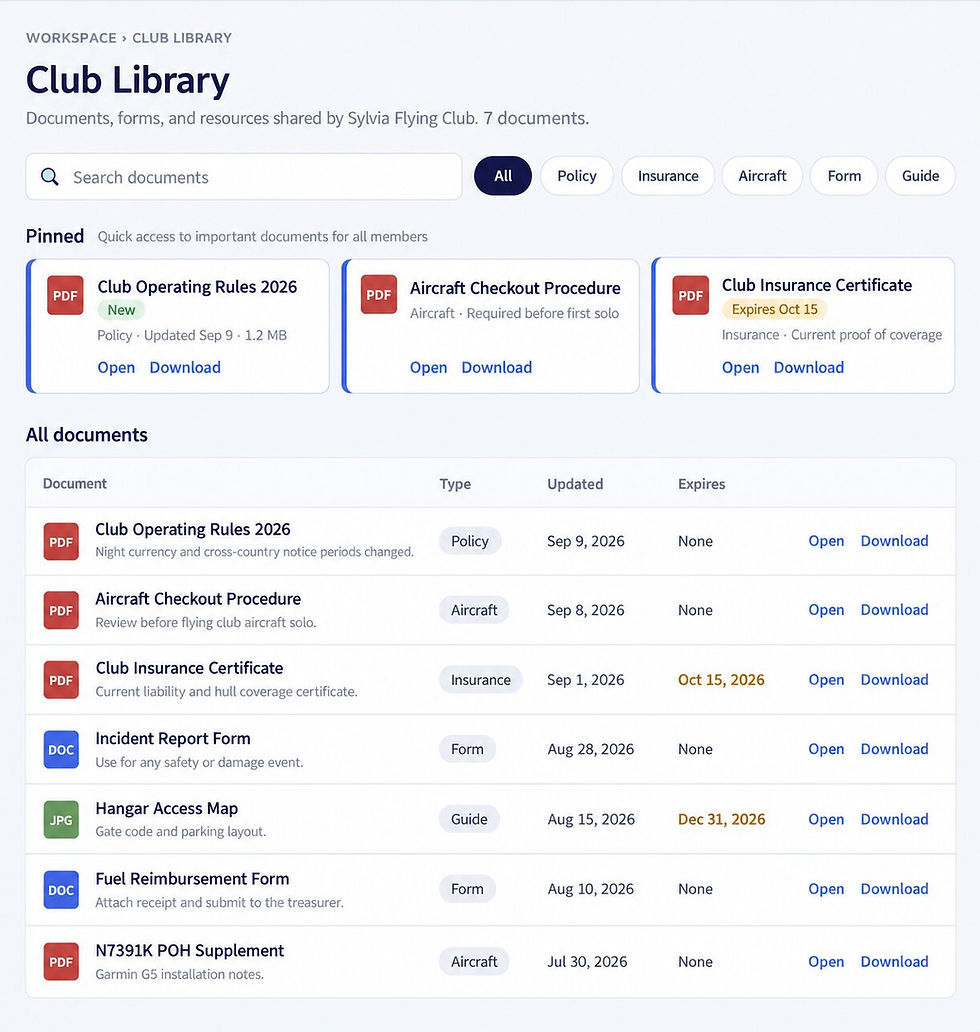
The Club Library lets administrators pin important documents for easier access. Examples might include:
Operating Rules
Aircraft Checkout Procedure
Safety Policy
Pinned documents are available at the top of the Library so members can quickly access the information they use most often.
Expiration dates that don't sneak up on you
Some club documents are only valid for a certain period of time. Insurance certificates, policies, agreements, and other time-sensitive documents may need to be updated regularly.
The Club Library allows administrators to track expiration dates so those dates are visible alongside the documents.
That makes it easier to identify documents that need attention before they become outdated.
Small things that save admin time
The Club Library also includes practical details that make document management easier.
Administrators can add:
Short descriptions
Internal administrator notes
Updated files while preserving the document's settings
Upload progress
These small features help keep the Library organized without creating extra administrative work.
What members see
Members get a straightforward way to find the documents that have been shared with them.
The Library includes:
Pinned documents
Search
Document type
Updated date
Expiration date
Members can access the Library from both mobile and desktop devices, making important club documents available when they need them.
Why this belongs in your scheduler
A flying club's documents are closely connected to the way the club operates.
Members may need to check an aircraft's checkout procedure before a flight, review operating rules, confirm insurance requirements, or access a form. Keeping those documents in the same system as the aircraft and instructor schedule means members have fewer places to look.
Instead of managing schedules in one system and important club documents somewhere else, PilotSchedule brings both parts of the workflow together.
The goal is simple: make the information members need easier to find while reducing repetitive administrative work for the people running the club.
How to turn it on
Setting up the Club Library takes three steps:
Upload your documents in Club Settings > Documents.
Enable Show the Club Library in the member menu under Club Settings > Preferences.
Tell your members that the Library link is now available in their menu.
New clubs have the Library enabled by default.
A good first set of documents
If you're setting up your Club Library for the first time, start with the documents members are most likely to need.
A useful starting set includes:
Operating Rules
Aircraft Checkout Procedure
Club Insurance Certificate
Renter Insurance Requirements
Incident Report Form
You can then add other documents as your club's needs grow.
Get started
Already using PilotSchedule? Go to Club Settings > Documents and start uploading the documents your members need.
Not using PilotSchedule yet? Create a free account and manage your aircraft schedule and important club documents in one place.
If you need help, contact support@pilotschedule.com.
Already using PilotSchedule? Go to Club Settings > Documents and start building your Club Library.
Not using PilotSchedule yet? Create a free account and manage your aircraft schedule and important club documents in one place.
PilotSchedule by TABA Systems. Aircraft scheduling for flying clubs, flight schools, partnerships and FBOs since 2003.