Flight School Scheduling Software: A Complete Guide (2026)

Updated: Sep 29
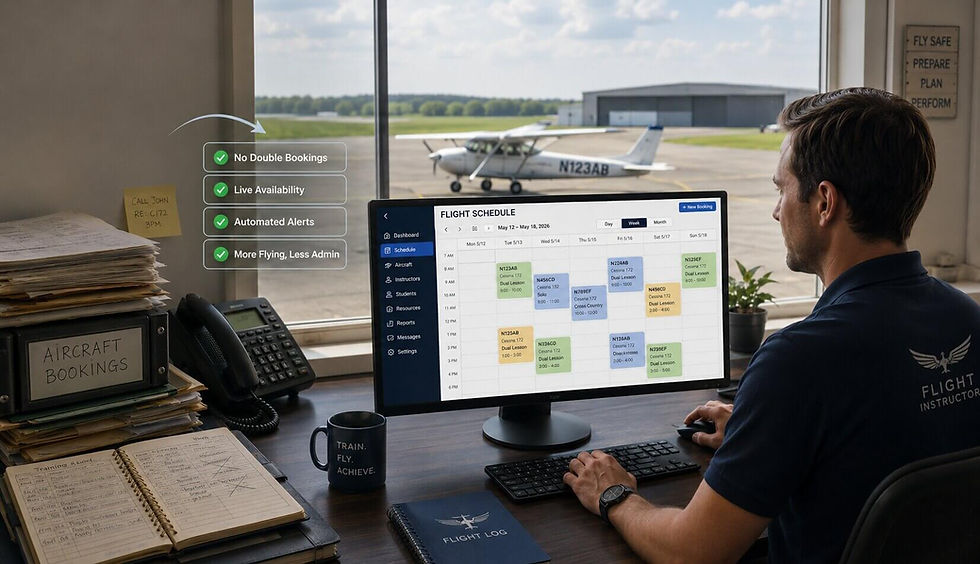
If you run a small flight school, a flying club, or share an aircraft with a few partners, you know the puzzle that starts every morning. Who has the 172 this afternoon? Is the instructor who teaches in it free at the same time? Did two students reserve the same plane for the same hour, and will anyone find out before they both show up at the ramp? When the answers live in a spreadsheet, a paper book, or a string of group texts, one of them eventually goes wrong, and it usually goes wrong on the day you can least afford it.
Flight school scheduling software exists to take that puzzle off your desk. This guide explains what it does, the problems it actually solves, the features worth paying for (and the ones you can skip), what the main tools cost in 2026, and how to choose one your members can learn in an afternoon instead of a quarter.
What is flight school scheduling software?
Flight school scheduling software is an online system for booking the resources that more than one person needs to share: aircraft, instructors, simulators, classrooms, or anything else you want to keep on a calendar. Instead of a spreadsheet only one person can safely edit, everyone sees the same live schedule, books their own time, and stops colliding with each other.
The useful ones are web based, so a pilot or student can check availability and reserve a slot from a phone at the airport or a laptop at home, at any hour. The best ones are simple enough that a new member books a first flight without a phone call to the office.
The problems it actually solves
Spreadsheets and shared calendars are free, which is why nearly every operation starts there. They hold up until you grow past a couple of aircraft, and then the cracks show in very specific ways:
The instructor-aircraft collision. A student books the airplane, but the instructor who signs off in it is already flying with someone else. A calendar that schedules the plane and the person in one step is the only thing that prevents this reliably.
The weather scramble. A front moves through, the morning's lessons cancel, and now you are rebooking a dozen flights by text while everyone competes for the same clear afternoon. A live calendar with a standby list sorts that out in minutes.
The grounded airplane. A squawk takes a plane offline. On a spreadsheet, the bookings just sit there until each pilot finds out the hard way. In a real system you block the aircraft once and everyone sees it.
The no-show and the slot hoarder. Some members block prime times far in advance and cancel at the last minute. Good software shows you who, and lets you set backup reservations so a freed slot goes to the next pilot in line instead of going to waste.
The single point of failure. The spreadsheet lives on one person's computer, and when they are out, nobody else can safely change it.
None of these are dramatic on their own. Together they are the steady drag that makes scheduling feel harder than flying, and they are exactly what this category of software removes.
The features that matter (and the ones you can skip)
Vendors compete on feature-list length. For a small or midsize school, club, or partnership, most of that list is weight you carry and pay for without using. Here is the short list that earns its keep:
Combined aircraft and instructor scheduling, so the plane and the person are booked together.
Real-time shared availability, so conflicts are prevented instead of discovered.
Backup or standby reservations, so members can claim the next spot and be notified when it opens. PilotSchedule emails your backup the moment it becomes the active reservation, which is the single thing people miss most when they leave a spreadsheet.
Self-service booking, so pilots and students reserve their own time and you stop being the switchboard.
Availability blocking, so instructors and pilots can mark the hours they are not available and nobody books them by mistake.
Custom resources, so a tow tractor, a sim, or a meeting room lives on the same calendar as the aircraft.
Mobile access, because a tool your members will not open on a phone is a tool they will not use.
Multi-club support from one login, useful for an instructor who flies with more than one club, or a partnership that runs alongside a school.
Then there is the heavy machinery: integrated billing engines, Hobbs and tach driven invoicing, maintenance work orders, squawk tracking, Part 141 and Part 61 recordkeeping, QuickBooks sync. These are genuinely valuable if you are a large training center or a university program, and the big platforms do them well. For a club with three airplanes or an instructor with a dozen students, they add cost and a learning curve to solve problems you do not have yet. The honest rule: buy the scheduling you need now, not the operations suite you might need in five years.
What flight school scheduling software costs in 2026
Here it pays to understand the pricing models, because the model matters as much as the number. There are three common ones.
Quote-based. The market leader, Flight Schedule Pro, does not publish a price. You request a custom quote and talk to sales. It is a capable, full-operations platform trusted by well over a thousand training centers and universities, and the pricing reflects that scope. If you mainly want a shared calendar, it is more platform, and more process, than the job requires.
Per aircraft, or per resource. Most of the field meters by the tail. Flight Circle publishes $10 per aircraft per month with unlimited users. Schedule Master runs roughly $8 to $12 per resource per month. Aviatize starts at $29 per aircraft per month on an annual plan.
The appeal is a low starting number. The catch is that the meter runs as you add airplanes, and on some tools instructors and other resources count too. MyFBO starts around $59 a month and, once you stack scheduling, billing, and maintenance modules, multi-aircraft clubs commonly land in the $200 to $400 per month range. (Prices here are what each company published as of mid-2026 and can change.)
Flat and published. PilotSchedule takes the third path: a fixed monthly price for a set number of resources, shown openly on the site. Solo is $19 a month for 2 resources, Basic is $49.99 for 5, Pro is $99.99 for 15, and Unlimited is $199.99 for unlimited aircraft, instructors, and resources. No setup fee, no contract, and a free account to start.
Flat pricing will not always be the rock-bottom number. A two-airplane club paying $10 a tail elsewhere is in the same neighborhood as Solo. What flat pricing buys you is predictability and transparency. You know the bill before you call anyone, it does not climb every time you add an instructor or a resource, and you are not buying a billing-and-maintenance suite just to get a calendar. For a small or midsize operation that mostly needs scheduling done well, that trade is usually the right one.
Who it is for, and who should look elsewhere
A guide that pretends one tool fits everyone is not worth much, so, plainly:
PilotSchedule is a strong fit if you are a flight school, flying club, aircraft partnership, FBO, or independent instructor who wants simple, reliable scheduling without an enterprise platform or a per-tail meter. It is built for the operations the big training systems tend to overlook.
You should look hard at the heavier platforms (Flight Schedule Pro, Aviatize, Talon Systems, and the like) if you are a large Part 141 school or a university program that needs integrated billing, maintenance tracking, syllabus and stage-check management, and deep compliance recordkeeping in one system. That is real work those tools do well, and it is worth paying for at that scale.
Knowing which group you are in saves you both money and a painful migration later.
Why a 20-year track record matters
Scheduling software sits in the middle of your daily operation, so the age and stability of the company behind it is not a footnote. PilotSchedule was created by a pilot and has been running reservations for flight schools, clubs, and partnerships since 2003. That is longer than most of the tools it gets compared with have existed (Flight Circle launched in 2014, and several others are newer still). Two decades of handling real bookings for real operations is the kind of track record you cannot fake with a feature list, and it is a big part of why a small club can hand it the one calendar everyone depends on.
How to choose, and how to start
When you have a shortlist, judge each option on the things that decide whether you will still be using it in a year. Can a new member book on the first try without a manual? Does the price fit your fleet with no contract? Does it work on a phone? Is it sized for an operation like yours? Can you trial it with your actual aircraft and instructors rather than a canned demo? When two tools look similar on paper, the simpler one almost always wins in daily use, because the goal is to remove friction, not to adopt a new system to manage.
Getting started is short. Open a free account, pick the plan that matches your number of resources, add your aircraft and instructors, invite your pilots and students, and start booking. Everyone sees the same live calendar from any device. If the first hour feels complicated, that tells you how the next year will feel.
Frequently asked questions
How much does flight school scheduling software cost?
It depends on the model. Per-aircraft tools start around $10 per aircraft per month and rise with your fleet. The market-leading platform is quote-based, so you contact sales for a number. Flat-rate options like PilotSchedule publish fixed tiers, from $19 a month for a small operation to $199.99 for unlimited resources.
What is the difference between flight school and flying club scheduling software?
The scheduling core is the same: book aircraft, instructors, and resources on one shared calendar. Flight schools lean more on student and instructor coordination, while clubs and partnerships lean on fair shared access and member self-booking. A tool that handles both, like PilotSchedule, works for either.
Do I need billing and maintenance tracking built in?
Only if your operation is large enough to need it. A big training center benefits from integrated billing, Hobbs-based invoicing, and maintenance work orders. A small club or a solo instructor usually just needs reliable scheduling, and the heavy modules mostly add cost and complexity.
Can students and pilots book their own flights?
Yes. With self-service booking, members see live availability and reserve their own time, and instructors can block the hours they are not available so nobody books them by mistake.
How hard is it to switch from a spreadsheet?
Not hard. For a small operation you can set up your aircraft and instructors, invite members, and be live the same day. There is no setup fee or contract with PilotSchedule, so you can trial it alongside your spreadsheet before you commit.
The bottom line
The right flight school scheduling software is the one that is easy to use, fairly and transparently priced, and sized for your operation. For a small or midsize school, club, partnership, or independent instructor, that means a simple online calendar your members actually enjoy using, with backup reservations and availability blocking a spreadsheet can never match, and without an enterprise platform or a per-tail meter you do not need.
PilotSchedule has done exactly that, built by a pilot and running since 2003:
straightforward scheduling, flat and published pricing, and no contract. If you are ready to retire the spreadsheet, you can set up your aircraft and instructors and start scheduling today.